

"Are You Having E-course Problems And Can't Access The Info?"
I got an email from one reader...
"Hi Merri Ellen. I'm excited to read your research on curing depression but I cannot get access to the 7 day e-course. Please help me."
Folks, have no fear. Here's what to do if you cannot access the free e-course...
If you get the message: 'page does not exist'...
When you click on the link in your first e-course email (after you subscribed)... if you get the message: 'page does not exist' - then copy and paste the entire course link into your browser. (The link must have gotten broken in your email).
Redirected back to Home page?
You may be having "Internet Explorer 7 problems" if you get redirected to the Home page when you try to access our 6 Step E-course link.
So sorry that Microsoft browser is giving you problems!
"How do you fix this problem?"
Option 1: The one option is to go with the Firefox browser which I use personally and is wonderful at eliminating those frustrating pop ups!
You can learn more and download it from www.mozilla.com
Then you should be able to view your clickable link!
BUT, if you prefer to use Internet Explorer 7…
Option 2: If you prefer to use Internet Explorer 7 (IE7) for your web browser: in order to access each link, you have to change the Internet Security settings and Enable "Allow websites to prompt for information using scripted windows".
(You could also try holding 'Ctrl' when you click on the link.)
No worries! Let me walk you through this…
a. Open Internet Explorer, click the Tools button, click Internet Options, and then click the Security tab.
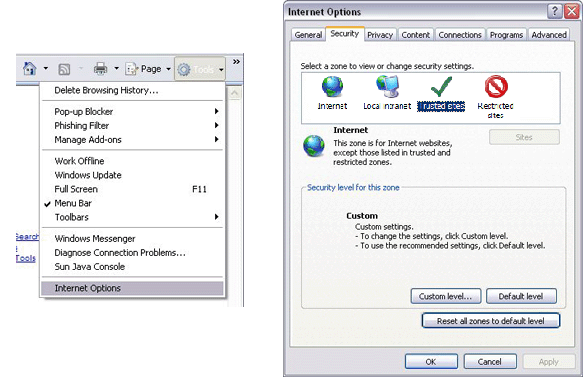
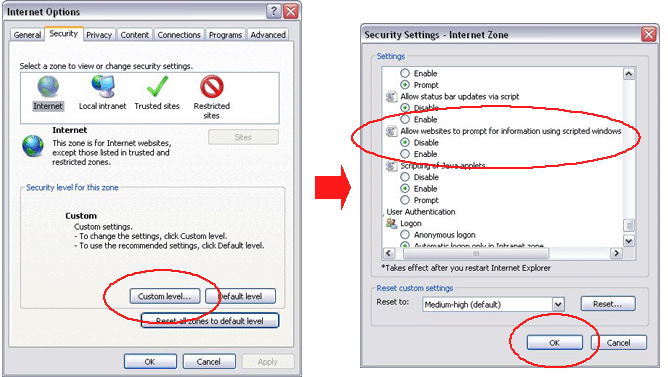
b. Click Internet, and then click the Custom level button.
c. Scroll down to Allow websites to prompt for information using scripted windows, select Enable.
d. Click OK until you return to Internet Explorer.
Hope this remedies the problem!
Let me know if it doesn't! (Use the contact form below).
Blessings,
Merri Ellen
